How to Print on Polyester Fabric in 2026?
Polyester is durable, quick-drying, and widely used in sportswear, banners, and home textiles. Yet its smooth fibers and heat sensitivity can make printing less predictable than printing on cotton. To Print Polyester Fabric successfully, match the method to the fabric, color, artwork, and intended use. In 2026, common options include dye sublimation for suitable light-colored polyester, and heat-transfer or screen-printing systems formulated for synthetic textiles.
Dye sublimation can produce vivid, integrated color, but it generally depends on polyester content and compatible transfer equipment. For dark fabrics or small custom runs, a suitable transfer film may be more practical. Check the ink or film maker’s instructions; temperature, pressure, and pressing time vary by product. Keep it practical. A test swatch can reveal dye migration, fading, or unwanted shine before you commit to a full garment. Small tests matter. Inspect the print after cooling and, when durability matters, after washing according to the care label. Even a careful setup can produce uneven results, especially across fabric blends or textured surfaces. That uncertainty deserves attention. This guide explains how to choose a printing method, prepare polyester, set up a test, and troubleshoot common defects. You will get a clearer process, not a promise of perfect results.
Understanding Polyester Fabric and Its Printing Requirements
Polyester is a synthetic fiber with a smooth surface and low absorbency. It dries quickly. That low absorbency affects how ink sits and bonds, so methods used for cotton may not work well on polyester. The fiber also softens under heat. Excessive temperature or pressure can flatten texture, distort seams, or leave shiny marks. These details matter when choosing a print process.
Dye-sublimation is commonly used on light-colored polyester. Heat turns disperse dye into a gas, which enters the softened polymer fibers and becomes part of the material. The print usually feels smooth because it does not form a thick layer on top. For dark fabric, other methods may be needed, such as compatible textile inks or a transfer with an opaque base. Results depend on the fabric’s color, weave, and any water-resistant or stain-resistant finish.
Before a full run, test a small swatch from the same fabric batch. Check color, edge sharpness, stretch, and whether the print cracks after gentle washing. Follow the ink or transfer supplier’s temperature and dwell-time guidance, then adjust cautiously; polyester blends can react differently. I would not assume a “polyester” label tells the whole story. A coated sports jersey and a plain woven shirt may need different settings, and one test can still miss variation across a roll.
Choosing a Printing Method for Polyester in 2026
Choosing a polyester printing method in 2026 starts with the fabric, not the machine.
Check its fiber content, surface finish, stretch, and intended use. A smooth, light-colored polyester shirt suits dye sublimation, which uses heat to move disperse dye into the fibers. The print feels integrated rather than layered. It is less suitable for dark fabric, and cotton blends can produce muted colors. Small differences matter.
For dark garments or mixed-fiber fabrics, film-based transfers or screen printing may offer better coverage. Their ink or adhesive sits on the surface, so hand feel and flexibility depend on the design and curing settings. Polyester can release dye under heat, causing unwanted color shifts in pale prints. Use a tested low-bleed system and follow its temperature guidance. Do not assume one press setting works for every garment. Test before scaling.
Choose based on run size, color detail, durability, and equipment access. Sublimation handles detailed, multicolor artwork efficiently, while screen printing can suit repeated designs. Transfers work for short runs, but thick layers may feel warm during wear. Wash and stretch a sample before approving production. Record the settings and fabric lot, too. I would not skip that step, even when the first print looks clean. Polyester is predictable, until its finish changes.
Preparing the Fabric, Artwork, and Equipment
Polyester can hold vivid prints, but preparation determines whether they stay sharp. Check the fabric label and composition before choosing a process. Sublimation works best on light-colored, high-polyester fabric; darker cloth usually needs a different transfer method. Wash the fabric if its care instructions allow, then let it dry fully. Lint, softener residue, and moisture can interfere with transfer. Clean and dry.
Lay the fabric flat and remove wrinkles with a brief pre-press. Use a scrap from the same material to test heat, pressure, and color. Polyester can flatten, shine, or discolor under excessive heat. I would not trust a setting just because it worked on another fabric; blends and finishes vary. Keep a protective sheet between the fabric layers to prevent ink from transferring where it should not.
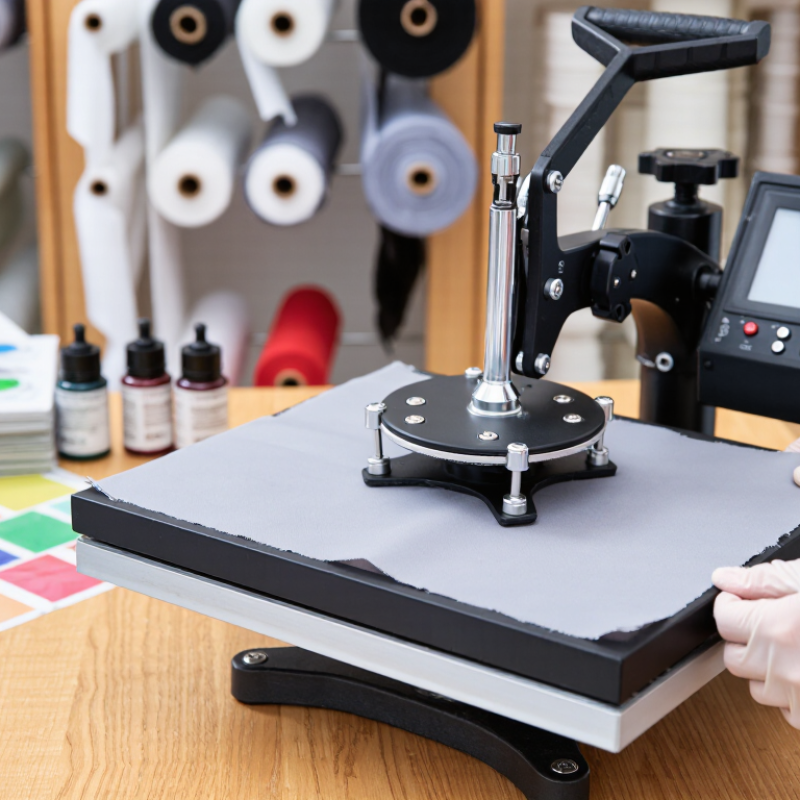
Prepare artwork at the final print size and check fine lines at actual scale. For sublimation, mirror the image before printing onto transfer paper; other methods may not require mirroring. Use ink and paper intended for the selected process, and confirm that the printer is configured correctly. Check the heat press with a reliable temperature reading, since its display may not match the platen surface. Small details matter. Record test settings, but treat them as a starting point, not a guarantee.
Printing and Setting Ink on Polyester Step by Step
Start with clean, dry polyester; even a little moisture can cause uneven transfer. Check the fabric label and printer or ink supplier’s settings before choosing a method. For sublimation, print a mirrored design onto transfer paper, then place it face down on the fabric.
Textile Exchange’s Materials Market Report 2024 estimates that polyester accounted for about 57.7 million tonnes of global fiber production in 2023. That scale matters: polyester is common, but finishes and fabric construction still affect print results.
Set the heat press to the ink system’s recommended temperature, pressure, and dwell time; many sublimation workflows use roughly 190–205°C for 30–60 seconds. These are starting points, not a universal recipe. Use a clean protective sheet, press a small test swatch, and let it cool before judging color and sharpness.
Too much heat can distort fabric or cause dye migration. With screen-printed inks, follow the specified curing profile and verify that the ink film reaches its required temperature. A surface reading alone may mislead. Check wash durability on the test piece, then adjust one setting at a time.
I still find color matching surprisingly fussy.
Checking Print Quality and Caring for Printed Fabric
After printing polyester, let the fabric cool and rest according to the ink or transfer process. Inspect it under bright, neutral light, not only beneath warm room bulbs. Look for pinholes, fuzzy edges, uneven color, and pale patches near seams. Look closely. Turn the fabric slightly; a print that seems solid head-on may show thin areas at an angle. Rub a clean white cloth over a hidden corner, first dry and then barely damp, to check for loose pigment. For heat-applied designs, test a spare swatch before stretching the finished piece. Too much heat or pressure can flatten texture, and some polyester dyes may migrate into lighter prints. One test is not a guarantee. Results vary.
Wash a small sample before treating the whole batch as finished. Use cool water, a gentle cycle, and mild detergent; turn garments inside out to reduce abrasion. Air-dry when possible. High dryer heat can stress both the print and fabric, even when the first wash looks fine. Avoid bleach and harsh stain removers unless the process instructions confirm they are safe. If ironing is needed, use low heat on the reverse, with a pressing cloth, and keep the iron moving. Check again after washing for cracking, color transfer, or lifted edges. Polyester can behave differently across weaves and finishes. A result that looked perfect on a smooth swatch may disappoint on a stretchy knit.
How to Print on Polyester Fabric in 2026? — Checking Print Quality and Caring for Printed Fabric
Care Temperature Reference for Printed Polyester
These are practical reference points, not universal settings: 30°C is a conservative wash temperature, while 110°C is the maximum associated with a one-dot iron care symbol. Always follow the garment care label and the print or ink supplier’s instructions. To check print quality, look for even color and sharp edges, then inspect the fabric for fading, cracking, or peeling after washing.